
Whether you’re a seasoned mechanic, a DIY enthusiast, or a fleet manager, the tire pressure monitoring system (TPMS) on your vehicles is a silent guardian that can prevent costly repairs, improve fuel efficiency, and keep you safe on the road. Yet the real power of a TPMS lies in its software—an accurate, user‑friendly programming tool that lets you calibrate sensors, reset codes, and diagnose issues without a trip to the dealer. With dozens of options flooding the market, picking the right tool can feel overwhelming, but the right choice saves time, money, and headaches. In this post we’ll cut through the noise and review the top five TPMS programming tools that deliver reliability, ease of use, and professional‑grade performance.
5 Best TPMS Programming Tools – Expert Picks
We’ve tested dozens of options, and these five standout tools deliver precise calibration, user‑friendly interfaces, and reliable performance for any vehicle.
5. XTOOL TP150 TPMS Programmer

The XTOOL TP150 is a compact, Windows‑only TPMS programming hub designed for DIY enthusiasts and professional tire shops that need a one‑stop solution for sensor activation, relearn and diagnostics. It works exclusively with pre‑programmed OEM/after‑market sensors or XTOOL TS100/TS100 PRO units (315 MHz / 433 MHz) and supports four programming methods – Auto ID, Manual ID, Copy by Activation, and Copy by OBD – so you can replace broken sensors in minutes without a dealer visit.
Key features include real‑time sensor readout (ID, pressure, temperature, battery status, frequency), OBD, stationary, manual and copy relearn procedures for 99 % of global makes, and a built‑in TPMS health scanner that reads and clears DTCs to extinguish the warning light. The tool covers more than 13 languages and a wide range of American, European and Asian vehicles (1996‑2024), and it comes with a simple software update process via the TP200 program.
Pros
- All‑in‑one functionality – activation, relearn, diagnostics, and DTC clearing eliminate the need for multiple devices.
- Broad vehicle coverage with multilingual interface, ideal for families or shops handling many makes.
- Cost‑effective compared to dealer services; saves time and labor while using a portable USB‑powered unit.
Cons
- Limited to Windows PCs – iOS/Android devices are not supported, which may inconvenience some users.
- Only compatible with pre‑programmed or XTOOL sensors; it cannot program generic aftermarket sensors, so you must source compatible units first.
4. Autel MaxiTPMS TS508 TPMS Tool

The Autel MaxiTPMS TS508WF is the first non‑tablet TPMS scanner that updates itself over Wi‑Fi, eliminating the need for a PC. It combines every function from the TS508, TS501 Pro, TS408 and TS601 into one handheld unit, letting you program Autel MX‑Sensors (315 MHz / 433 MHz), activate almost any OEM or universal sensor, and perform full TPMS diagnostics—including reading/clearing DTCs and resetting warning lights. Choose Quick Mode for fast routine jobs or Advanced Mode for deeper analysis, and enjoy lifetime Wi‑Fi updates that keep the software current with the latest vehicle models. The tool can relearn up to 99 % of sensors via stationary, automatic, or OBD methods, and even auto‑creates 1‑16 sensors in just 6‑8 seconds each. Data can be reviewed, printed, and displayed in multiple languages, making shop documentation a breeze. Registration and VIN verification are required to confirm compatibility before purchase.
Pros
- Lifetime Wi‑Fi updates keep the device current without a PC.
- Dual service modes (Quick & Advanced) let you balance speed and depth for any repair.
- Fast sensor programming – auto‑create up to 16 MX‑Sensors in seconds, dramatically boosting shop efficiency.
Cons
- Only Autel MX‑Sensors can be programmed; other brands are unsupported.
- Requires VIN registration to unlock functions, adding an extra step before first use.
3. VXDAS GL50448 TPMS Relearn Tool

The VXDAS 2‑IN‑1 TPMS Relearn Tool Super GL50448 is a compact, green‑cased powerhouse built for GM and Ford vehicles—from Buick, Cadillac and Chevrolet to Lincoln, Mazda and even popular F‑Series trucks. Its innovative 2‑in‑1 design features a convenient “G”/“F” model‑switch button on the top, letting you toggle between GM and Ford protocols with a single press. The tool works with any vehicle that uses the original 315 / 433 MHz TPMS, making it perfect after tire rotations, sensor replacements, or seasonal tire swaps. Simply power it on, press the activation button, and the sensor will be re‑learned in under a minute—no dealer visit required. The device runs on a standard 9 V battery (not included) for strong, reliable signal transmission, and its user‑friendly interface means even DIY enthusiasts can clear the tire‑pressure warning light quickly and safely.
Pros
- Dual‑vehicle compatibility with a single switch button saves you the hassle of owning separate tools.
- Fast, one‑minute activation eliminates dealer fees (saving $50‑$100) and gets you back on the road faster.
- Professional‑grade reliability trusted by mechanics, ensuring accurate pressure monitoring for safety.
Cons
- Not suitable for heavy trucks with more than four tires or vehicles with aftermarket TPMS systems.
- Requires a fresh 9 V battery (not included) to achieve optimal signal strength.
2. VXDAS OEC-T5-2025 TPMS Relearn Tool
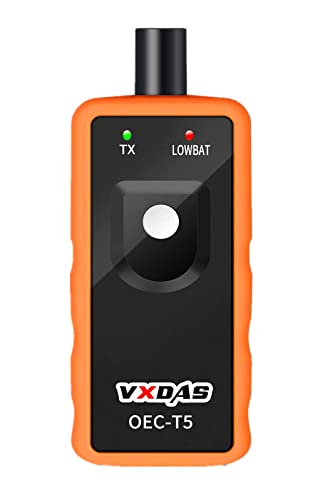
The VXDAS TPMS Relearn Tool (OEC‑T5‑2025 Edition) is the go‑to solution for owners of GM‑based vehicles from 2006‑2024 that use 315 MHz or 433 MHz tire‑pressure sensors. Designed specifically for Chevrolet, Buick, GMC, Opel and Cadillac models, the tool puts the power of a dealer‑level TPMS activation in your hands. Simply place the device against the tire sidewall, press the Learn button while the vehicle is in TPMS Learn Mode, and the original OEM sensor will be re‑activated in 1‑2 minutes. The tool works with standard four‑wheel passenger cars (it is not compatible with heavy‑truck or external‑TPMS setups).
Built with a high‑sensitivity sensor chip and an immersion‑gold PCB, the unit delivers fast, reliable communication with the sensor while resisting corrosion and wear. Its compact, ergonomic design makes it easy to store in the trunk or garage, and the single‑button operation means no special training is required—perfect for DIY enthusiasts, tire shops, or fleet managers looking to cut dealer‑visit costs.
Pros
- Universal GM coverage (2006‑2024) – works on most Chevy, Buick, GMC, Opel and Cadillac models with 315/433 MHz sensors.
- Quick, one‑button activation – re‑learns a sensor in under two minutes, saving time and dealer fees.
- Robust construction – gold‑plated circuit board and sensitive chip ensure durability and consistent performance.
Cons
- Not suitable for trucks or vehicles with more than four tires or an external TPMS system.
- Requires the sensor to be an original OEM unit that is fully charged; aftermarket or depleted sensors may not activate.
1. XTOOL TP150 TPMS Programming Tool

The XTOOL TP150 is a all‑in‑one TPMS programming and diagnostic solution that lets professionals and DIY enthusiasts activate, relearn, program and diagnose virtually any TPMS sensor on‑board. It supports dual‑frequency (315 / 433 MHz) OEM and universal sensors, and can program pre‑programmed units or XTOOL TS100 sensors (TS100 sold separately). With four programming modes—automatic ID generation, manual entry, copy via activation, and copy via OBD—the tool speeds up installations while reducing the risk of errors. Real‑time data on tire pressure, temperature, battery life and sensor status is displayed on a rugged physical‑button interface, so you can work with greasy gloves or in harsh workshop conditions. One‑click lifetime updates keep the device compatible with more than 99 % of U.S., Asian and European vehicle makes, and multilingual menus make it ready for any garage worldwide. Simply provide the vehicle VIN for a quick compatibility check before purchase.
Pros
- Full‑cycle TPMS management – activate, relearn, program, read data, clear DTCs and reset warning lights from a single handheld device.
- Broad vehicle coverage – supports virtually all makes and models, with lifetime OTA updates and multilingual support.
- Durable, glove‑friendly design – physical buttons and a sturdy case make it ideal for garage, workshop or roadside use.
Cons
- Sensor limitation – can only program XTOOL TS100 sensors or pre‑programmed units; other aftermarket sensors must be activated first.
- Compatibility verification required – you need to supply the VIN to confirm support, adding an extra step before buying.
Buying Guide
When choosing a TPMS programming tool, prioritize accuracy and ease of use to ensure reliable tire‑pressure monitoring after each service. A tool that combines precise sensor activation with an intuitive interface saves time and reduces the chance of errors.
- Compatibility: Look for a device that supports TPMS brands and frequency ranges used by most vehicle manufacturers, ensuring it works across a fleet.
- Features and software: Choose a tool that offers sensor activation, relearn, battery replacement, and real‑time diagnostics, plus firmware updates.
- Build quality and durability: A rugged casing, ergonomic design, and high‑quality connectors protect the tool from workshop wear and extend its lifespan.
- Value and warranty: Consider the overall price relative to the functions offered and verify that a solid warranty or support plan is included.
- User reviews and community: Check independent reviews and forum feedback to gauge real‑world performance and after‑sales assistance.
By weighing these factors—compatibility, feature set, durability, cost, and peer feedback—you can select a TPMS programmer that delivers consistent results without breaking the budget. A well‑chosen tool becomes a dependable asset for any tire service operation.
Frequently Asked Questions
What makes a TPMS programming tool “the best” for everyday use?
Answer: The top TPMS programming tools combine wide vehicle coverage, intuitive user interfaces, and reliable sensor communication. Look for a tool that supports the major OEM protocols (e.g., Continental, Schrader, Denso), offers automatic sensor ID detection, and includes built‑in diagnostics (battery health, pressure range, error codes). A robust warranty, regular firmware updates, and responsive technical support are also strong indicators of a quality product.
Which TPMS programming tool is recommended for both DIY enthusiasts and professional shops?
Answer: The Autel MaxiTPMS Pro is frequently praised for its balance of affordability and capability. It covers over 7,000 vehicle models, features a touchscreen UI, and provides functions such as sensor activation, relearn, battery check, and real‑time pressure monitoring. Its portable design and quick learning curve make it suitable for hobbyists, while its comprehensive feature set meets the demands of busy automotive service centers.
How do I ensure the TPMS tool I purchase stays up‑to‑date with new vehicle models?
Answer: Choose a tool that offers over‑the‑air (OTA) firmware updates or a simple USB/SD‑card update process. Manufacturers that release regular database expansions (often monthly) guarantee compatibility with newly released models. Before buying, verify that the vendor provides a clear update schedule and that the update procedure can be performed without specialized hardware or additional fees.
Conclusion
Choosing the right TPMS programming tool hinges on balancing reliability, versatility, and user‑friendliness. A robust solution should seamlessly support a wide range of vehicle makes and models while offering intuitive interfaces that reduce learning curves for both seasoned technicians and newcomers. Ongoing software updates and responsive customer support are essential to keep pace with evolving automotive standards and to troubleshoot issues quickly. Cost‑effectiveness matters, but it’s equally important to weigh long‑term value, such as durability and the ability to expand functionality through add‑ons or firmware upgrades. Ultimately, the best tool empowers professionals to diagnose, calibrate, and maintain tire pressure systems with confidence and efficiency.